Introduction
A few years ago, productivity was often measured by how many hours someone worked. Today, many professionals are realizing that working longer doesn’t always mean working better.
Recently, I spoke with a freelancer who was struggling to manage client projects, meetings, deadlines, invoices, and personal tasks. He felt busy all day but wasn’t making the progress he expected.
After reviewing his workflow, the problem became clear.
He was spending too much time switching between tasks, searching for information, and organizing work manually.
A few weeks later, he started using several productivity apps to automate repetitive tasks, manage projects, and organize his daily schedule. The result was impressive. He wasn’t necessarily working more hours, but he was accomplishing significantly more work.
This is exactly why productivity apps have become essential in 2026.
Modern professionals face constant distractions, growing workloads, and increasing demands. The right productivity tools can help manage time more effectively, improve organization, and reduce stress.
If you’re looking to work smarter rather than harder, these productivity apps are worth considering.
Why Productivity Apps Matter More Than Ever
Today’s professionals manage more information than ever before.
Most people regularly deal with:
- Emails
- Meetings
- Projects
- Deadlines
- Client communication
- Documents
- Team collaboration
Without proper organization, it’s easy to feel overwhelmed.
Productivity apps help create structure, reduce manual work, and improve efficiency.
The goal isn’t simply to stay busy.
The goal is to focus on meaningful work while minimizing unnecessary distractions.
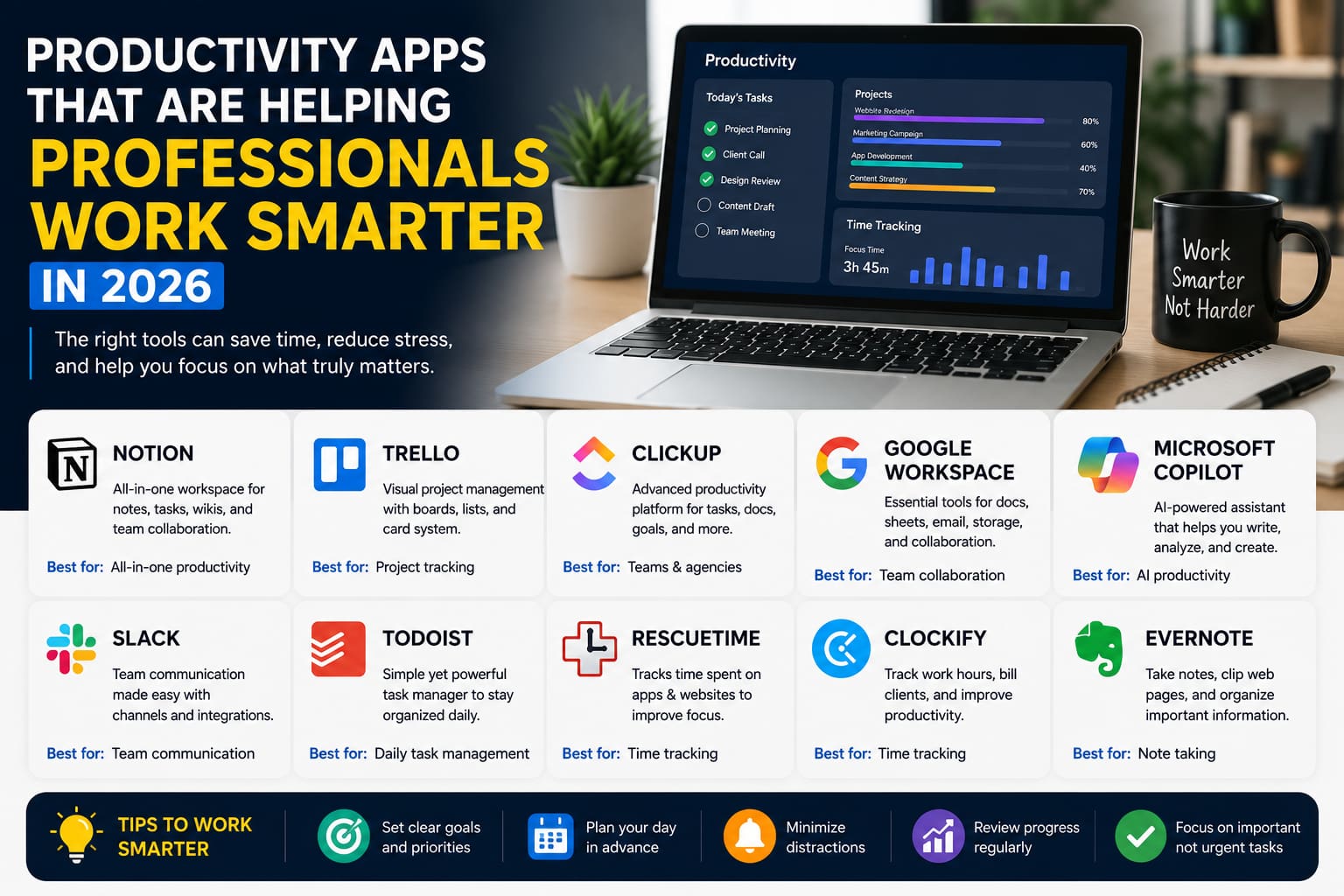
Notion – The All-in-One Productivity Workspace
Notion continues to be one of the most popular productivity platforms in 2026.
Many professionals use it as a central hub for:
- Notes
- Task management
- Project planning
- Team collaboration
- Knowledge management
One reason Notion remains popular is its flexibility.
Users can customize workspaces to fit their specific needs.
Best For
- Freelancers
- Students
- Remote teams
- Business owners
Key Benefits
- Centralized information
- Custom workflows
- Strong collaboration features
For professionals managing multiple projects, Notion can become an indispensable tool.
Trello – Simple and Effective Project Management
Trello remains one of the easiest project management apps available.
It uses a visual board system that helps users track tasks and project progress.
Common uses include:
- Managing projects
- Tracking assignments
- Organizing workflows
- Team collaboration
Its simplicity makes it especially attractive for beginners.
Best For
- Small teams
- Freelancers
- Personal productivity
Key Benefits
- Easy setup
- Visual organization
- User-friendly interface
Many professionals appreciate Trello because it reduces complexity while maintaining effectiveness.
ClickUp – Advanced Productivity Management
ClickUp is designed for users who need more advanced productivity features.
The platform combines:
- Task management
- Goal tracking
- Project planning
- Team collaboration
- Time tracking
Many growing businesses use ClickUp because it can replace multiple separate tools.
Best For
- Agencies
- Growing businesses
- Project managers
Key Benefits
- Comprehensive functionality
- Workflow automation
- Team productivity
While the learning curve is slightly higher, the capabilities are impressive.
Google Workspace – Essential for Daily Collaboration
Google Workspace continues to play a major role in professional productivity.
The ecosystem includes:
- Google Docs
- Google Sheets
- Google Drive
- Google Meet
- Gmail
Many organizations rely on Google Workspace because collaboration happens in real time.
Team members can work together without constantly sending files back and forth.
Best For
- Teams
- Businesses
- Remote workers
Key Benefits
- Cloud accessibility
- Real-time collaboration
- Reliable ecosystem
For many professionals, Google Workspace forms the foundation of daily work.
Microsoft Copilot – AI-Powered Productivity
Artificial intelligence is transforming workplace productivity.
Microsoft Copilot integrates AI directly into productivity workflows.
It helps with:
- Document creation
- Data analysis
- Email drafting
- Meeting summaries
- Presentation development
One interesting trend in 2026 is that professionals increasingly use AI assistants to reduce repetitive work.
This allows them to spend more time on strategic thinking and decision-making.
Best For
- Office professionals
- Corporate teams
- Business users
Key Benefits
- AI-powered assistance
- Time savings
- Improved efficiency
Slack – Better Team Communication
Communication remains one of the biggest productivity challenges.
Slack helps teams communicate efficiently without relying entirely on email.
Features include:
- Team channels
- Direct messaging
- File sharing
- App integrations
Fast communication often leads to faster decision-making.
Best For
- Remote teams
- Hybrid workplaces
- Growing businesses
Key Benefits
- Organized communication
- Reduced email overload
- Faster collaboration
Todoist – Simple Task Management
Sometimes the simplest tools are the most effective.
Todoist focuses on helping users manage daily tasks and priorities.
It allows users to:
- Create task lists
- Set deadlines
- Organize priorities
- Track progress
Many professionals prefer Todoist because it stays focused on core productivity needs.
Best For
- Personal productivity
- Freelancers
- Busy professionals
Key Benefits
- Simplicity
- Speed
- Easy organization
RescueTime – Understanding How Time Is Spent
Many people believe they are productive until they analyze how their time is actually spent.
RescueTime helps users monitor:
- Application usage
- Website activity
- Focus time
- Productivity patterns
The insights can be surprising.
One observation I’ve noticed is that many professionals lose more time to distractions than they realize.
Tracking behavior often leads to immediate improvements.
Best For
- Remote workers
- Freelancers
- Productivity enthusiasts
Key Benefits
- Better time awareness
- Improved focus
- Productivity insights
Practical Tips for Using Productivity Apps Effectively
Simply installing productivity apps won’t automatically improve results.
Success depends on how the tools are used.
Start With One Tool
Avoid adopting too many apps at once.
Create Consistent Workflows
Develop routines that support productivity.
Automate Repetitive Tasks
Look for opportunities to reduce manual work.
Review Progress Regularly
Analyze what’s working and what isn’t.
Focus on Results
Productivity isn’t about being busy.
It’s about accomplishing meaningful goals efficiently.
Common Productivity Mistakes to Avoid
Using Too Many Apps
Tool overload often creates confusion.
Ignoring Organization
Even the best apps require proper structure.
Constant Notifications
Too many alerts can reduce focus.
Overcomplicating Workflows
Simple systems are often more sustainable.
Professionals who keep processes streamlined typically achieve better long-term results.
The Future of Productivity Software
Productivity software continues evolving rapidly.
Future trends include:
- AI-powered automation
- Smarter collaboration tools
- Personalized workflows
- Advanced analytics
- Improved integrations
Technology will increasingly help professionals focus on creative and strategic work while automation handles repetitive tasks.
The future of productivity is not about working harder.
It’s about working smarter.
FAQ
1. What is the best productivity app in 2026?
The best app depends on your needs, but Notion, ClickUp, Trello, and Microsoft Copilot remain among the most popular choices.
2. Can productivity apps really save time?
Yes. Many apps reduce manual work, improve organization, and streamline workflows.
3. Which productivity app is best for freelancers?
Notion, Todoist, and Trello are excellent options for freelancers.
4. Are free productivity apps worth using?
Many free plans offer significant value and are suitable for most users.
5. How many productivity apps should I use?
Most professionals benefit from using a small number of well-integrated tools rather than many separate applications.
Conclusion
Productivity apps are becoming essential tools for modern professionals. From project management and communication to AI-powered assistance and time tracking, these platforms help people work more efficiently and stay organized.
The most effective professionals are not necessarily the busiest. They are often the ones who use the right tools to manage their time, reduce distractions, and focus on meaningful work.
As technology continues evolving, productivity software will become even more powerful, helping individuals and businesses achieve better results with less effort.
Related Resources
Yentice.me
https://yentice.me/
MegaDealsHub24
https://megadealshub24.blogspot.com/?m=1
About the Author